Telegram booking bot: how clients book, pay and get reminders
How a booking bot works for a salon, a clinic, a tutor or any business that sells time: free slots, a slot held while the client pays, reminders, cancellations and your staff’s day, with what we built for a school and a kitchen.

 Bots · Telegram booking bot
On this page
A Telegram booking bot shows clients your free slots by service, specialist and day, holds the chosen slot while they confirm or pay a deposit, sends reminders before the visit and lets them cancel or move it by your rules, while you and your staff see the day’s bookings in the bot or on a web dashboard. We build bots from $100, from 3 days. We haven’t built a salon booking bot yet; the closest is a bot for an English teacher that holds a seat for 15 minutes while the student pays and sends payment reminders at 72, 48, 12 and 2 hours.
In numbers- Telegram bots start from $100 and take from 3 days; the price is fixed in a written scope before work starts.
- In the English school bot a seat is held for 15 minutes while the student pays, and a payment left unfinished gets one reminder after 10 minutes.
- The same bot reminds a student about payment at 72, 48, 12 and 2 hours before the deadline and frees the seat if nobody pays.
- Text message reminders raised attendance at healthcare appointments compared with no reminders, in a Cochrane review of 7 studies with 5,841 people (2013).
- Telegram bots can message their users at no cost, but a bot can’t start a conversation: the user has to write to it first.
What does a booking bot do?
It takes the back-and-forth out of booking. Instead of “is Thursday at 3 free?”, “no, how about 5?”, “and with Anna?”, the client opens a chat in Telegram, taps a service, a specialist and a free time, and the booking is made. The bot then reminds them before the visit and lets them cancel or move it within your rules, and you see the whole day without retyping anything.
A booking bot fits any business that sells time: a salon or a barber, a clinic or a massage room, a tutor, a photographer, a consultant. It runs inside Telegram, which had over 1 billion monthly active users in March 2025, according to its founder Pavel Durov, so clients who already use it book without installing anything or creating an account.
First, what we have and haven’t built. There is no salon booking bot among our cases yet. The pieces of one are in two bots we did build: a bot for an English teacher that sells seats in small groups, holds a seat while the student pays and reminds them about payment, and a lunch delivery bot for a kitchen in Batumi that takes orders by date with a cutoff. We use both below as examples, as related work and not as a salon case.
What does the client see?
A short path from the first message to a confirmed time:
- a service, with its length and price;
- a specialist, or “anyone free”;
- a day, then a time from the free slots only;
- a name and a phone number, the first time;
- a deposit, if you take one;
- a confirmation with the address and buttons to cancel or move.
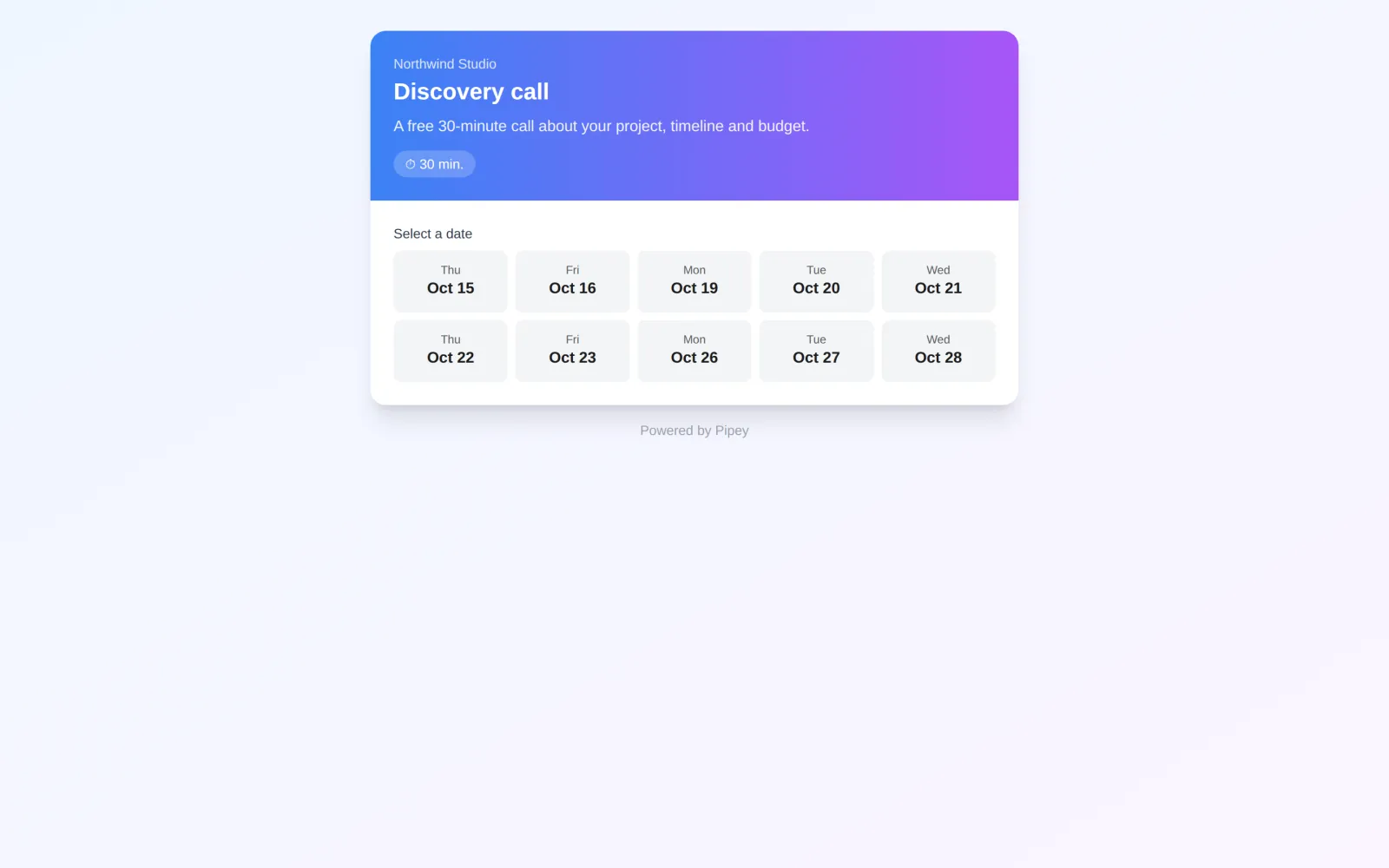
Only the name and the phone number are typed by hand, so there is little to misread. A booking page in a browser follows the same idea. In Pipey, our beta CRM now in the archive, a client opens a public booking page, picks a date from the next two weeks and then a time, and the booking lands in the CRM as a new contact and a deal.
Where do the free slots come from?
From your schedule, not from a person checking a notebook. You set the working days and hours of each specialist, the length of each service and the breaks, and the bot works out the free slots and shows only those. In Pipey the booking page builds its slots from the working days, the hours and the slot length in its settings.
Two more rules decide what a client can book: how far ahead, and how late. Pipey shows two weeks ahead. The lunch bot closes orders for a date the day before, at a time the owner sets, 23:59 by default, so the kitchen knows how many sets to cook. A salon might stop online bookings two hours before a slot; a tutor might want a day’s notice. Each of these can be a setting the owner changes, the way the lunch kitchen’s owner sets the cutoff time.
When a booking is cancelled or moved, its slot goes back on the list straight away. In the English school bot a freed seat goes one step further: everyone on the waiting list for that level hears about it.
How does the bot hold a slot while the client pays?
It reserves the slot for a few minutes, so the last free time can’t be sold twice. The English school bot holds a seat for 15 minutes while the student pays for one class or a package of four. If a payment is started and not finished, the bot sends one reminder after 10 minutes. Once the money is in, the student gets an invite to the group chat; if time runs out, the seat goes back on sale.
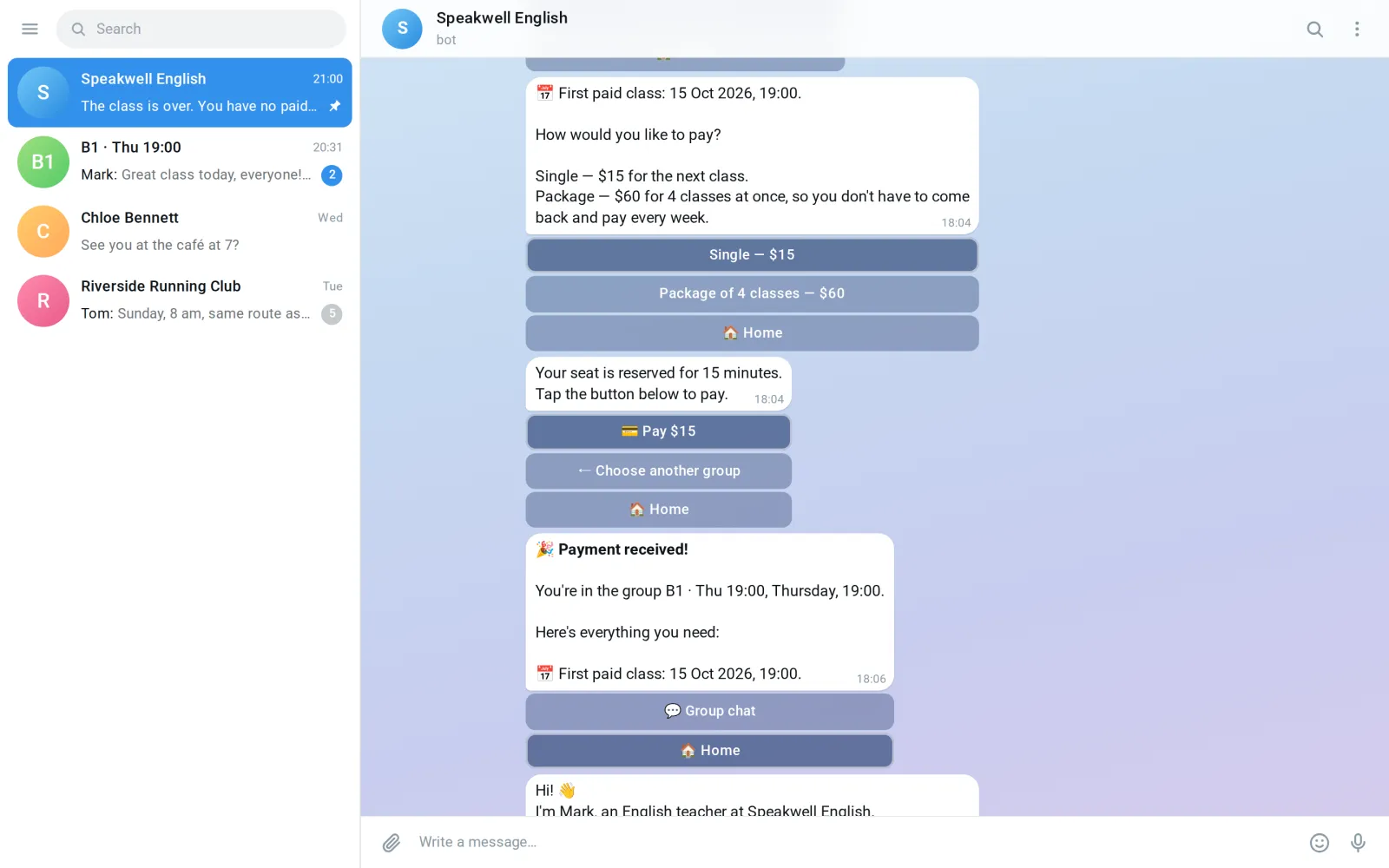
A booking bot does the same with a deposit. When a bot takes payment for physical goods or services, Telegram adds no fee of its own: as of October 2026, its documentation on bot payments says it takes no commission on such payments, and the payment provider charges its own.
Double taps are handled too. In the lunch bot a double tap never creates a second order, and a booking bot works the same way: one tap, one booking.
Reminders, cancellations and moves
Reminders cost almost nothing to send. Telegram’s bot FAQ says bots can message their users at no cost. There is one condition: a bot can’t start a conversation, so the user has to write to it first. A client who booked through the bot already has, so the reminders reach them.
Do they work? For clinics, a Cochrane review from 2013 found that text message reminders raised attendance compared with no reminders, across 7 studies with 5,841 people, and worked about as well as phone call reminders across 3 studies with 2,509 people. Those were text messages, not Telegram, but a reminder in a chat the client already reads is the same kind of message.
The English school bot shows how a run of reminders can work. A student with no lessons left after a class has 72 hours to pay for the next one, and the bot reminds them at 72, 48, 12 and 2 hours before the deadline, in the same chat where they paid. If nobody pays, the seat is freed and the waiting list hears about it. For appointments you pick your own times, for example the day before and two hours before.
Cancelling and moving follow your rules too. You decide until when a client can cancel by themselves, what happens to a deposit, and whether moving is allowed. When you or your staff cancel, the bot asks for a reason, the way the lunch kitchen’s dashboard does for a rejected or cancelled order, so you can see later why bookings fell through.
What do you and your staff see?
Everyone sees their own part. A specialist opens the bot and sees today’s bookings in order; the owner or the administrator sees everyone’s day, changes the schedule and answers questions. In the lunch bot, staff have their own role with today’s orders to pack and deliver.
The admin panel can live in one of two places. In the English school bot it is inside the same bot: requests, groups, statistics, promo codes and the bot’s texts. The lunch kitchen’s owner works in a web dashboard instead, with an order board in five columns and a monthly calendar where a day’s menu can be dragged to another date. A calendar of bookings on a big screen is the same kind of view. A web dashboard costs more than a panel in the bot, so start with the bot if a phone is where you work anyway.
A booking service or your own bot?
A ready service is often enough, and it is fair to say so. Calendly’s Standard plan was $10 per seat a month billed yearly in October 2026, or $12 billed monthly, and its free plan has no automatic reminders and no payments at booking. If clients find you through your site and pay at the visit, a service like that does the job. If you don’t have a site yet, our article on website costs has those prices.
| What you compare | Booking in chats | A service like Calendly | Your own Telegram bot |
|---|---|---|---|
| Where the client books | In messages to you | On the service’s page | In Telegram, where they already write to you |
| Free slots | You check and reply | Shown by the service | Shown by the bot from your schedule |
| Reminders | You write them | Not on the free plan | At the times you choose |
| Deposits | A bank transfer you check | Not on the free plan | In the chat, with the slot held while they pay |
| Your own rules | In your head | Within the service’s settings | Whatever you agree in the scope |
| Cost | Your time | A fee per seat, every month | From $100 for the build, fixed in the scope |
Your own bot fits when your clients already write to you in Telegram, when you need rules a service doesn’t offer, such as a held slot with a deposit or a waiting list, or when you want bookings to land in a CRM you already use. Our article on a bot or an app covers the case where your clients aren’t on Telegram at all.
How much does a booking bot cost?
Our Telegram bots start from $100 and take from 3 days. In our price list each thing a client does in the bot is a scenario, and taking payment is its own item. Say your bot lets a client book, cancel or move a visit, and get a reminder: three scenarios. With a deposit, that starts from $300; with a web dashboard for the owner instead of a panel in the bot, from $700. These are rough figures from the list, not a quote. You pay for hosting the bot, and if the bot is on our support, hosting is included in the support price.
For timing, the English school bot, with payments, lesson balances, reminders and the teacher’s panel, went live five days after work began. The lunch bot and the owner’s web dashboard took ten days. Our article on what a Telegram bot costs goes through each price driver with these two bots.
Pick what your bot needs and see a rough price. It counts from our price list, so it is a starting point for the call, not a quote.
A rough estimate, not a quote. The exact price comes in the written scope after a free call: some things turn out simpler than they look, some harder.
Get an exact price →- A bot with one scenario and one language, managed in the botfrom $100
- Each extra scenario+$50
- Taking payment+$100
- A web dashboard instead of managing in the bot+$400
- Each connection: CRM, spreadsheet, site+$100
- Each extra language+$100
The first call and the written scope are free, and the price changes only if the scope changes. You click through a working prototype before the bulk of the work, and the person who scopes your bot builds it and stays on after launch. If you run groups rather than one-to-one visits, the bot for an online school is closer to what you need.
Questions
How does a Telegram booking bot work?
The client opens the bot, picks a service, a specialist and a free time, and confirms. The bot holds the slot while they confirm or pay, reminds them before the visit and lets them cancel or move it by your rules. You see every booking in the bot or on a web dashboard.
How much does a booking bot cost?
From $100, from 3 days. Extra scenarios such as cancelling or reminders, taking a deposit, a web dashboard, connections to your CRM and extra languages add to it, and the price is fixed in a written scope after a free call.
Can the bot take a deposit or prepayment?
Yes. As of October 2026, Telegram takes no commission on bot payments for physical goods and services; the payment provider charges its own fee. While the client pays, the slot is held for them, the way the English school bot holds a seat for 15 minutes.
Will the bot remind clients about their appointment?
Yes, at the times you choose. A Telegram bot can message its users at no cost once they have written to it, and booking through the bot counts.
What if two clients try to book the same time?
The first one to confirm gets it. The slot is held while a client confirms or pays, so two people can’t take it at once, and a double tap never creates a second booking.
Can my staff see their bookings in the bot?
Yes. Each person gets a role and sees only what they need. In the lunch delivery bot, staff see today’s orders to pack and deliver, and the owner runs everything from a web dashboard.
Is a booking service like Calendly enough?
Often it is, if clients book from your site and pay at the visit. Calendly’s Standard plan is $10 per seat a month billed yearly, and its free plan has no automatic reminders or payments at booking. A Telegram bot fits when your clients already write to you in Telegram and you need rules of your own: deposits, held slots, a waiting list.
Sources
- Telegram: Bots, an introduction for developers (bots can’t start conversations with users)
- Telegram: Bots FAQ, broadcasting to users (bots message their users at no cost)
- Telegram: payments in bots
- Pavel Durov’s Telegram channel: over 1 billion monthly active users, 19 March 2025
- Gurol-Urganci I. et al. Mobile phone messaging reminders for attendance at healthcare appointments. Cochrane Database of Systematic Reviews, 2013 (PubMed)
- Calendly: pricing, Standard plan billed yearly and monthly (opened 31 October 2026)
ZabSoft is a software company in Batumi. The person who scopes your project is the person who builds it.
More from the blog
 ZabSoft · Cases
A delivery bot and CRM in ten days
How a kitchen in Batumi moved lunch orders out of chat and into a Telegram bot and a dashboard, one day at a time.
15 Oct 2026 ZabSoft · Pricing
How much does a Telegram bot cost in 2026
What moves the price of a bot: the number of scenarios, payments, an admin panel, integrations and languages.
16 Oct 2026 ZabSoft · CRM
Build or buy: a CRM for a small business
When an off-the-shelf CRM is enough, and the signs that your process needs a tool of its own.
16 Oct 2026