A Telegram bot for an online school or tutor
What a Telegram bot can run for a tutor or a small online school, shown on a bot we built for an English teacher with nine groups: seats, payments, lesson balances, reminders and the teacher’s panel.

 Bots · Telegram bot for an online school
On this page
A Telegram bot can run the routine of an online school: students pick a group by level and see the free seats, pay for one class or a package of four and get an invite to the group chat, while the bot counts lessons, reminds about payment and frees unpaid seats. The teacher runs groups, requests and level checks from a panel in the same bot. We build such bots from $100, from 3 days; the Speakwell English bot for a teacher with nine small groups went live five days after work began.
In numbers- A Telegram bot starts from $100 and takes from 3 days; the price is fixed in a written scope before work starts.
- The Speakwell English bot sells seats in 9 groups of up to 4 students and went live 5 days after work began.
- A seat is held for 15 minutes while the student pays for one class or a package of four.
- A student with no lessons left gets 72 hours to pay, with reminders at 72, 48, 12 and 2 hours before the deadline.
- In 2024, 33% of EU internet users did an online course or used online learning material in the previous 3 months, up from 30% in 2023, according to Eurostat.
What can a Telegram bot do for an online school?
It can take over the routine around your classes: selling seats, collecting payment, counting lessons and reminding the people who forgot to pay. A Telegram bot for an online school is a chat in Telegram that students open like any other conversation. They find a group, pay and get into the group chat with buttons, and you run the schedule, the students and the money from a panel in the same bot.
We built one for an English teacher who runs nine small groups of up to four students, on different days of the week. In the Speakwell English case (the client’s details are changed), the work before the bot looked like this: sell the free seats, collect payment before each class, note who came, remind whoever forgot to pay and offer a freed seat to the next person in line. Done by hand in chats, that is a second job on top of teaching.
More people are learning online. In 2024, 33% of internet users in the EU did an online course or used online learning material in the three months before the survey, up from 30% in 2023, according to Eurostat. For a teacher, each new student is one more payment to check and one more seat to keep count of.
What does a student see in the bot?
A student sees a short path from the first message to a seat in a group. They open the bot, choose group classes and get a list of every group with its level, day, time and the number of seats left. A tap on a group opens its card with the day, the time and the date of the next class.
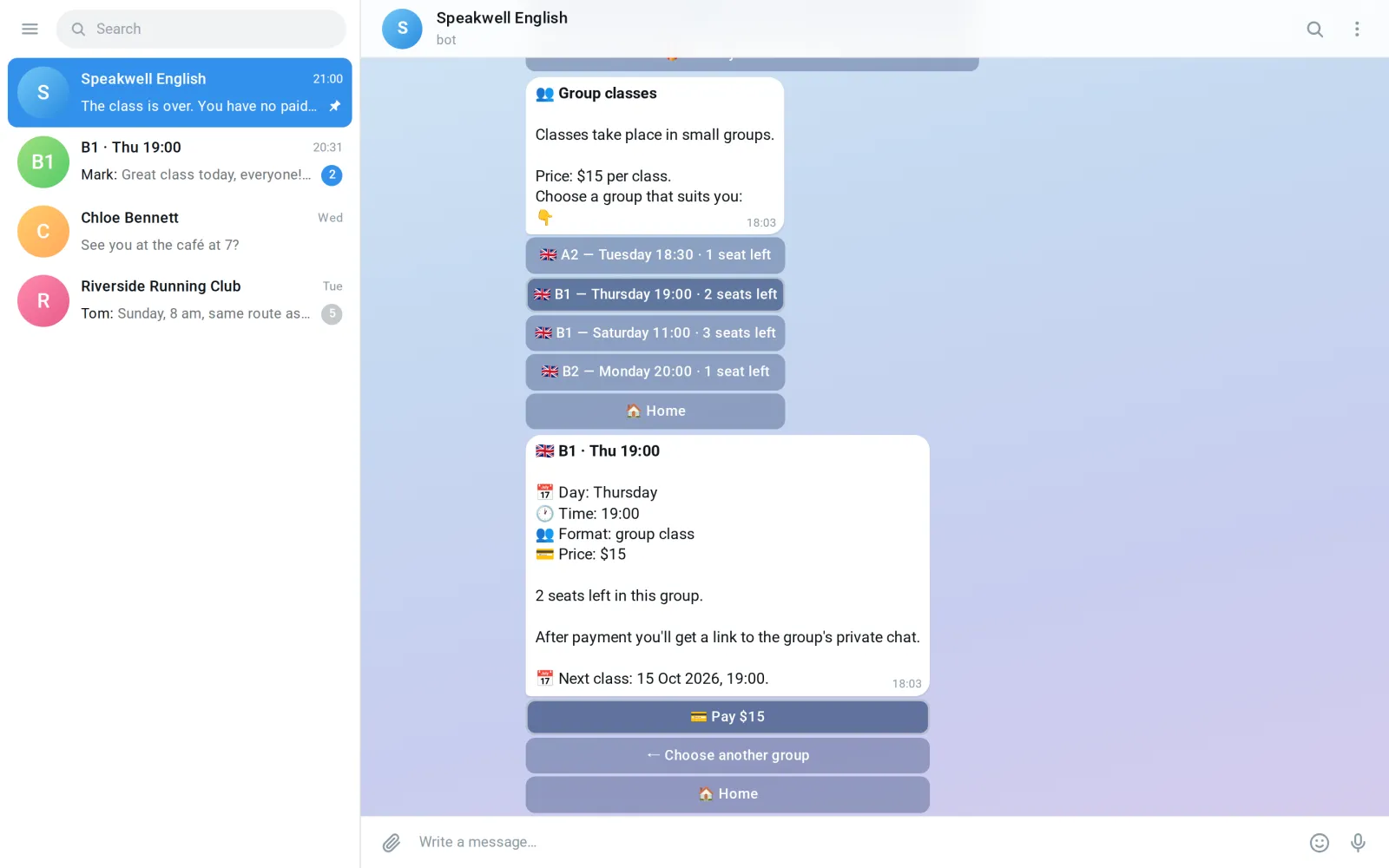
From the card the student goes to payment. The bot asks for a promo code if they have one, then offers one class or a package of four. The package is offered only when the group has four classes ahead.
While the student pays, the seat is held for them for 15 minutes, so two people can’t buy the last seat at once. If a payment is started and not finished, the bot sends one reminder after 10 minutes. Once the money is in, the student gets a personal invite to the group’s private chat. If someone else joins through that link, the bot cancels it and sends the student a new one, so a forwarded link doesn’t let a stranger into the class.
Two more paths matter for a school. A new student who doesn’t know their level can send a voice message for a free level check, and the teacher replies with the level, so the student picks the right group. And when a group is full, the student taps a button to hear about a new seat. The waiting list is kept by level, not by group, so a seat that frees up in any B1 group reaches everyone waiting for B1.
Which rules does the bot run on its own?
The bot runs the rules that start on a clock rather than with a tap: closing classes, charging lessons, reminding about payment and freeing seats. Nobody has to remember them.
Closing a class. When two hours have passed since a class started, the bot closes it and takes one lesson off every paid seat. Then it asks the teacher whether the class took place, with three answers: everyone was there, not everyone was there, or the class didn’t happen. By default the lesson is charged. Under each student’s name the teacher can tap “Keep lesson” for someone who missed the class for a good reason, and “the class didn’t happen” gives the lesson back to everyone.
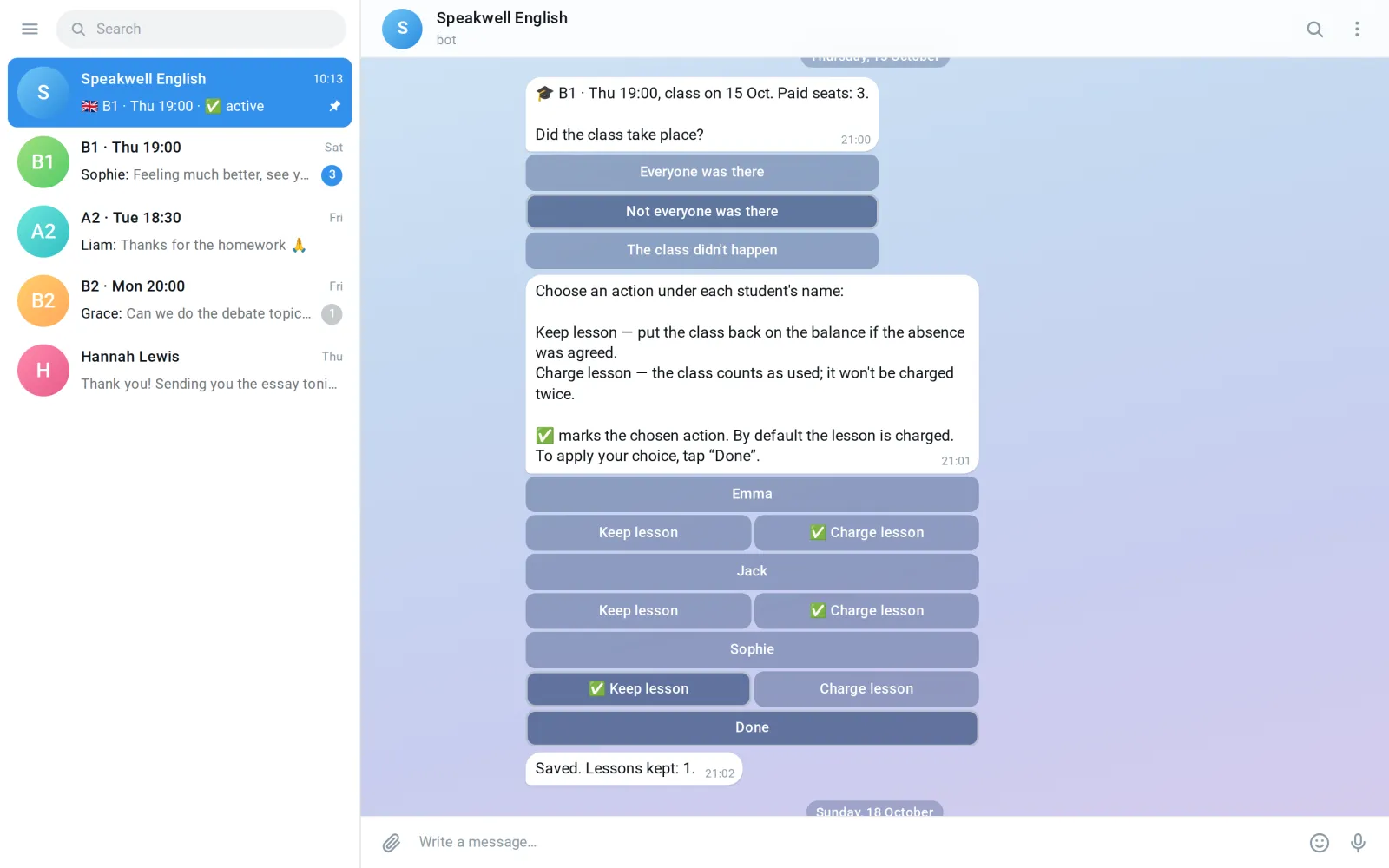
The lesson balance. Every student has a balance of lessons in each group, and every change to it has a reason the teacher can see: a payment, a refund, a class, an absence with a good reason, a class that didn’t happen, or a manual correction, which always needs a comment.
Reminders. When a student has no lessons left after a class, they get 72 hours to pay for the next one. The bot reminds them at 72, 48, 12 and 2 hours before the deadline, in the same chat where they paid.
Freeing a seat. If the deadline passes without payment, the seat goes back on sale, the student leaves the group chat, the teacher gets a notice, and everyone on the waiting list for that level hears that a seat is free. The teacher doesn’t have to chase anyone for money or remove anyone from the chat by hand.
One rule changed before launch, and it is worth thinking about if your groups meet on different days. The first plan had one weekly payment day for everyone. With nine groups spread across the week, that gave one group four days between its class and the request to pay, and another only a few hours. So each group got its own payment cycle, tied to its own class.
How is a bot different from chats and a spreadsheet?
The difference is who does the routine: with chats and a spreadsheet it is you, every week, and in a bot the rules run by themselves. Here is the same school week done both ways.
| Task | By hand, in chats and a spreadsheet | In the bot |
|---|---|---|
| Free seats | You answer “is there room on Thursday?” in private messages | Every group shows its level, day, time and seats left |
| Two people want the last seat | Whoever you answer first gets it | The seat is held for 15 minutes while the student pays |
| Payment and access | You check the payment, then add the student to the group chat | A personal invite to the group chat arrives after payment |
| After a class | You note who came and update the spreadsheet | The bot charges a lesson for each paid seat and asks you to confirm |
| An absence with a good reason | You have to remember to give the lesson back | One tap on “Keep lesson” |
| A student runs out of lessons | You write a reminder, then another one | Reminders at 72, 48, 12 and 2 hours |
| Nobody paid | You remove the student and look for someone to offer the seat to | The seat is freed, the student leaves the chat, the waiting list hears about it |
| “Why do I have two lessons?” | You scroll back through the chats | Every change to the balance has its reason |
A spreadsheet can hold the same data, but it doesn’t act on it: it won’t send a reminder 2 hours before a deadline or take someone out of a group chat. If you have a couple of groups and everyone pays on time, a spreadsheet may be enough. With several groups on different days, the reminders and the counting add up to that second job.
What does the teacher run from the panel in the bot?
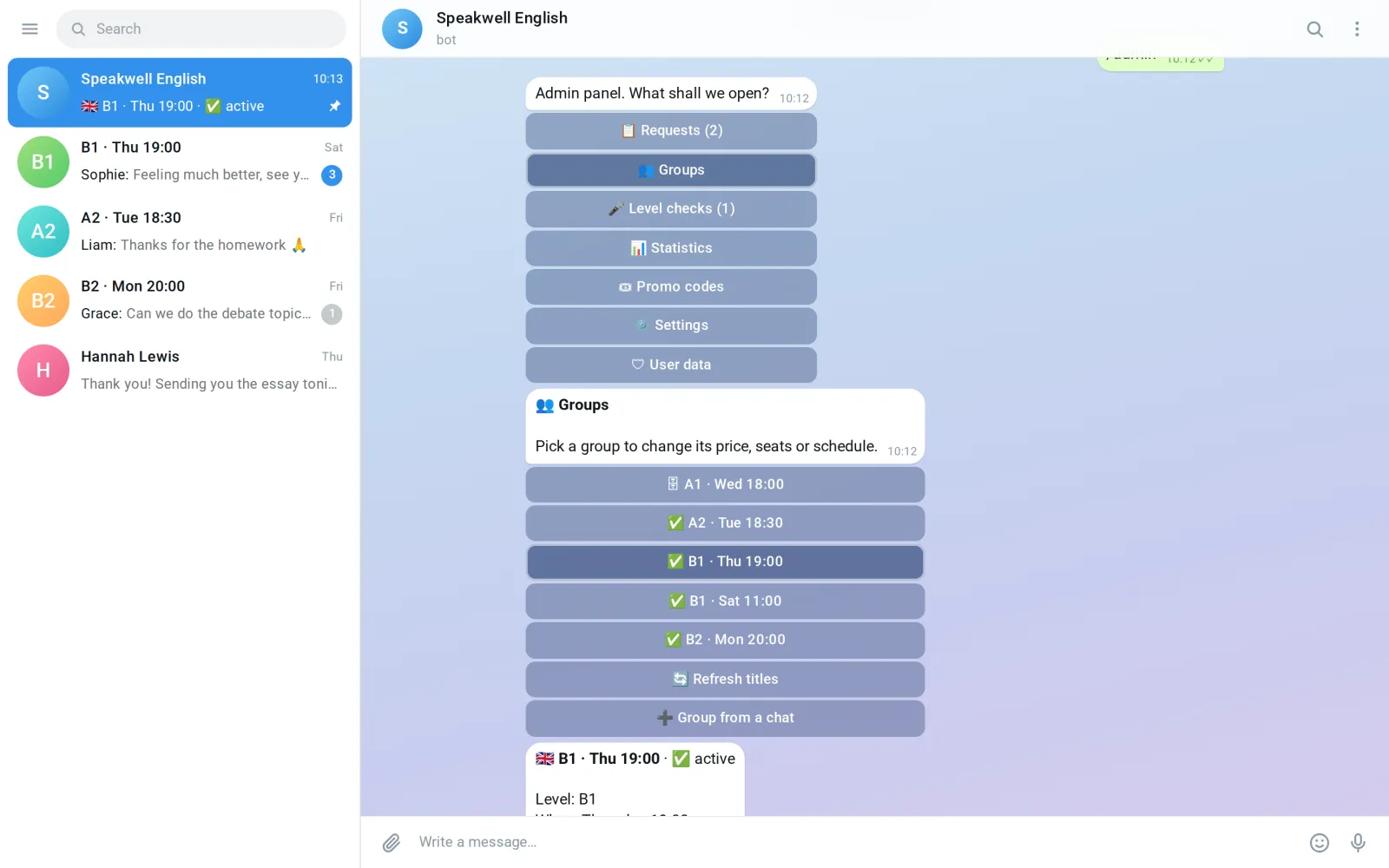
The teacher runs the school from the same bot the students use, so there is no separate website to log in to. The panel opens with one command and holds requests, groups, level checks, statistics, promo codes and the bot’s texts.
In groups the teacher sets the price, the number of seats, the day and the time, sends a finished group to the archive and sees each student’s lesson balance with the history behind it. Requests for one-to-one lessons arrive in the panel, and new students’ voice messages wait in level checks until the teacher answers. The bot’s texts can be changed from the panel without asking a developer, and a student’s data can be deleted from there too.
A school that already has students doesn’t start from zero. Before launch, current students got a button in their group chat, and one tap brought each of them into the bot already linked to their group. Later the bot learned to handle a student in several groups at once, each group with its own balance and payment deadline, and a move to another group carries the remaining lessons along.
Which schools is it for, and where does a bot stop?
This setup fits a tutor or a small school that sells seats in groups on a schedule and wants students to pay per class or in packages. It fits especially well when your groups already talk in Telegram group chats, because the bot hands out access to those chats itself.
A bot stops where Telegram stops. If your students aren’t on Telegram, a bot won’t reach them, and our article on a bot or an app goes through that choice. And everything in this article happens around the class: seats, money, lessons on the balance, reminders. The class itself is the teacher’s.
You also don’t need everything on day one. The Speakwell English bot kept growing after launch: students could join several groups from 23 August, and in October we went over it again so that no payment or access to a group chat gets lost in unusual cases. A first version can take the one job that eats most of your week now.
How much does a bot for a school cost, and how long does it take?
Our Telegram bots start from $100 and take from 3 days. The Speakwell English bot, with payments, lesson balances, reminders and the teacher’s panel, went live five days after work began: the design started on 10 August 2026, and the bot launched on 15 August.
The final price depends on what the bot has to do: how many scenarios it has, whether it takes payments, where the admin panel lives, integrations and languages. Our article on what a Telegram bot costs uses this same school bot as one of its two examples.
The first call and the written scope are free. We name the price once the work is agreed and counted; it is fixed before work starts and changes only if the scope changes. You click through a working prototype before the bulk of the work, and the person who scopes your bot also builds it. We work remotely from Batumi, Georgia, in English or Russian.
Questions
How much does a Telegram bot for an online school cost?
From $100, and it takes from 3 days: the Speakwell English bot went live five days after work began. The price depends on the scenarios, payments, where the admin panel lives, integrations and languages, and it is fixed in a written scope after a free first call.
Can students book a seat in a group through the bot?
Yes. In the Speakwell English bot a student sees every group with its level, day, time and free seats, and the chosen seat is held for 15 minutes while they pay.
Can a Telegram bot take payment for lessons and count them?
Yes. The student pays for one class or a package of four, and the bot keeps a lesson balance for each student: it charges one lesson after every class and records the reason for each change.
What happens when a student doesn’t pay for the next lesson?
They get 72 hours, with reminders at 72, 48, 12 and 2 hours before the deadline. If the money doesn’t come, the seat is freed, the student leaves the group chat and the waiting list for that level hears about the seat.
Does the teacher need a separate admin website?
No. In the Speakwell English bot the admin panel lives in the same bot: requests, groups, level checks, statistics, promo codes and texts, with each student’s lesson balance and its history.
How do current students move into the bot?
Each group chat gets a message with a button. One tap brings a student into the bot already linked to their group.
Can one student study in several groups?
Yes. Since 23 August, after launch, a Speakwell English student can join several groups, each with its own lesson balance and payment deadline, and a move to another group carries the remaining lessons along.
Sources
ZabSoft is a software company in Batumi. The person who scopes your project is the person who builds it.
More from the blog
 ZabSoft · Websites
A restaurant or bar website: what guests check first
The menu with prices, the mood, today’s hours, the way there and a way to book: what a guest looks for on a phone, and how one lounge bar site answers it.
25 Oct 2026 ZabSoft · Websites
A service company website that brings in requests
Finished jobs, reviews next to them and a short form that lands in your Telegram: what turns a contractor’s page into requests.
25 Oct 2026 ZabSoft · CRM
A CRM for food delivery: orders, menu and couriers
Order statuses with fixed moves, a menu calendar you drag, client history and the daily menu mailing: what a kitchen owner needs from a CRM.
25 Oct 2026