A CRM for food delivery: orders, menu and couriers
What a delivery kitchen’s owner needs from a CRM, shown on the Lunchbox Batumi dashboard: an order board with fixed moves, a menu calendar, client history and the daily menu mailing.

 CRM · Food delivery
On this page
A CRM for food delivery should follow the kitchen’s day: an order board with your statuses, a menu calendar, client history and the daily menu mailing. With us it costs from $500 and takes from 2 weeks. In the Lunchbox Batumi dashboard, orders from the Telegram bot land on a board with five statuses, and rejecting, cancelling or a failed delivery asks for a reason.
In numbers- A CRM for a delivery kitchen with us costs from $500 and takes from 2 weeks, at a fixed price agreed in writing before the work starts.
- The Lunchbox Batumi board has five statuses, from new to delivered; rejecting, cancelling or a failed delivery asks for a reason.
- Every day at 12:00 Batumi time the menu for the day after tomorrow goes to clients with a delivered order in the last 7 days.
- On its busiest day so far the kitchen’s bot took 15 orders, and the client says deliveries have become more accurate and the kitchen saves a lot of time.
- In 2025, 19.7% of EU accommodation and food service companies with 10 or more people used CRM software, against 28.5% across all the sectors the survey covers, according to Eurostat.
What does a CRM for food delivery do?
A CRM for food delivery is the owner’s side of the business: the screen where every order lands, moves through the kitchen’s statuses and ends as delivered, or with a reason why it wasn’t. The menu and the list of clients sit next to it. Some people call it restaurant delivery software. The name matters less than whether it follows your day.
We built one for Lunchbox Batumi, a kitchen that delivers set lunches six days a week. Its owner has to know how many sets to cook for each day, where each one goes and who ordered what. Before, all of that sat in chat messages that someone had to retype.
Clients now order in a Telegram bot: a few taps for the day, the number of sets, cutlery and an address. This article is about the other side, the web dashboard where the owner runs the kitchen, and what to ask for if you are choosing one.
How should an order move from new to delivered?
Through a fixed set of statuses that match the kitchen, with rules about which move comes next. In Lunchbox the board has five columns: new, contacted, confirmed, packed and delivered. An order from the bot appears in the first column already filled in, and from there it moves only to the statuses its rules allow next.
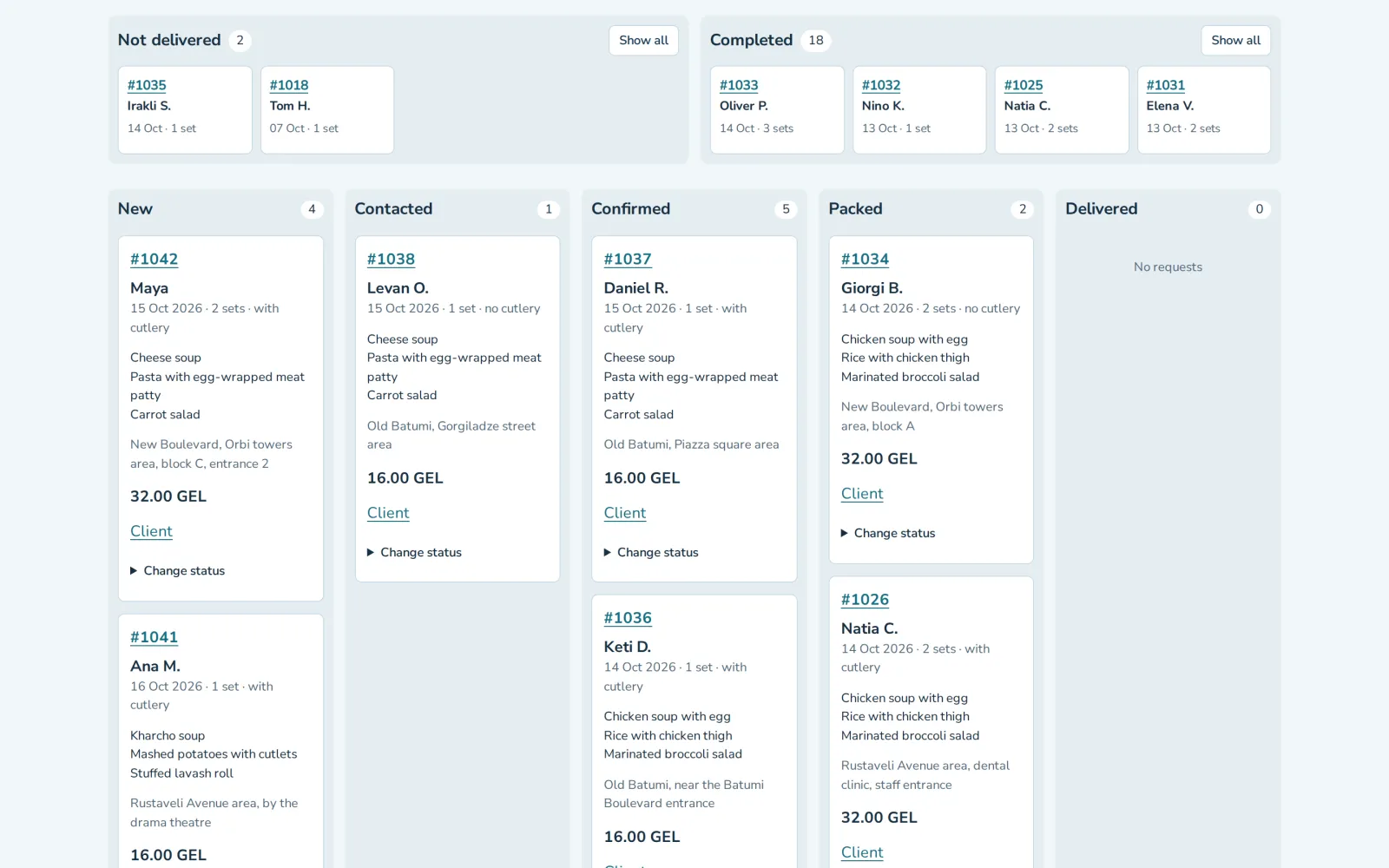
Not every order ends well, and the board treats that as part of the job. Rejecting an order, cancelling it or marking a failed delivery asks for a reason. A week later, “not delivered” on its own tells you nothing. With a reason written down, you can tell a wrong address from a kitchen that ran late.
Above the columns sit two short lists: the last four orders that were not delivered and the last four that were completed, with the full lists one click away. A delivered order is completed at once, so the columns hold the work that is still open.
The overview page opens with four of today’s numbers, and the latest orders with their statuses sit below them.
How do you plan the menu a month ahead?
On a calendar, where moving a day is a drag rather than a rewrite. Lunchbox keeps the menu in a monthly calendar with three dishes a day: soup, a main and a salad. The kitchen’s menu runs in a cycle of 24 days, four weeks of six.
When plans change, the owner drags a day to another date. If that date already has a menu, the two swap places, photos included. Orders that clients have already placed keep their date, their dishes and their price, so moving the menu never changes what someone ordered.
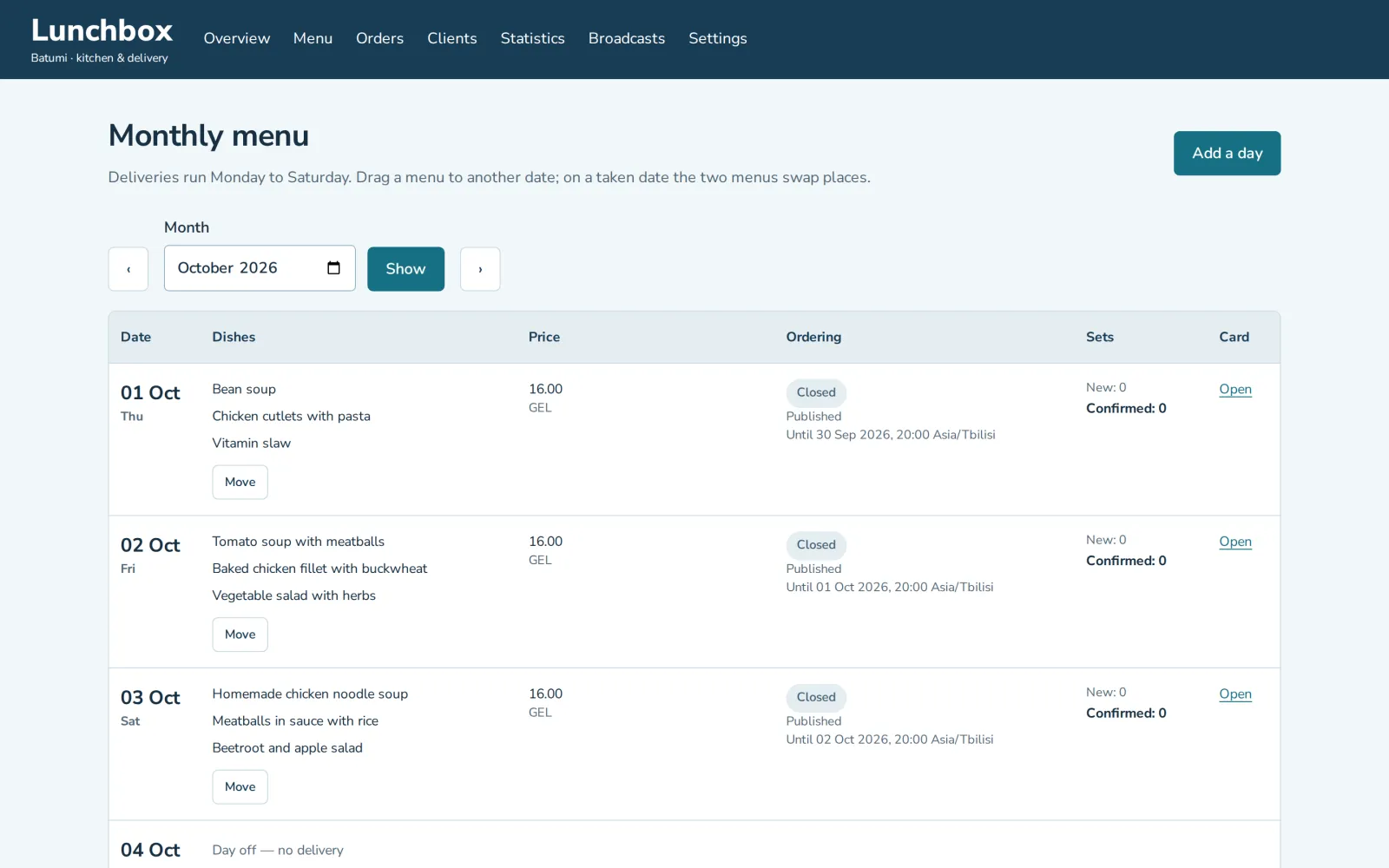
Ordering for each date stops the day before, at a time the owner picks (23:59 unless changed), so by the morning the kitchen knows how many sets to cook.
What should the CRM remember about each client?
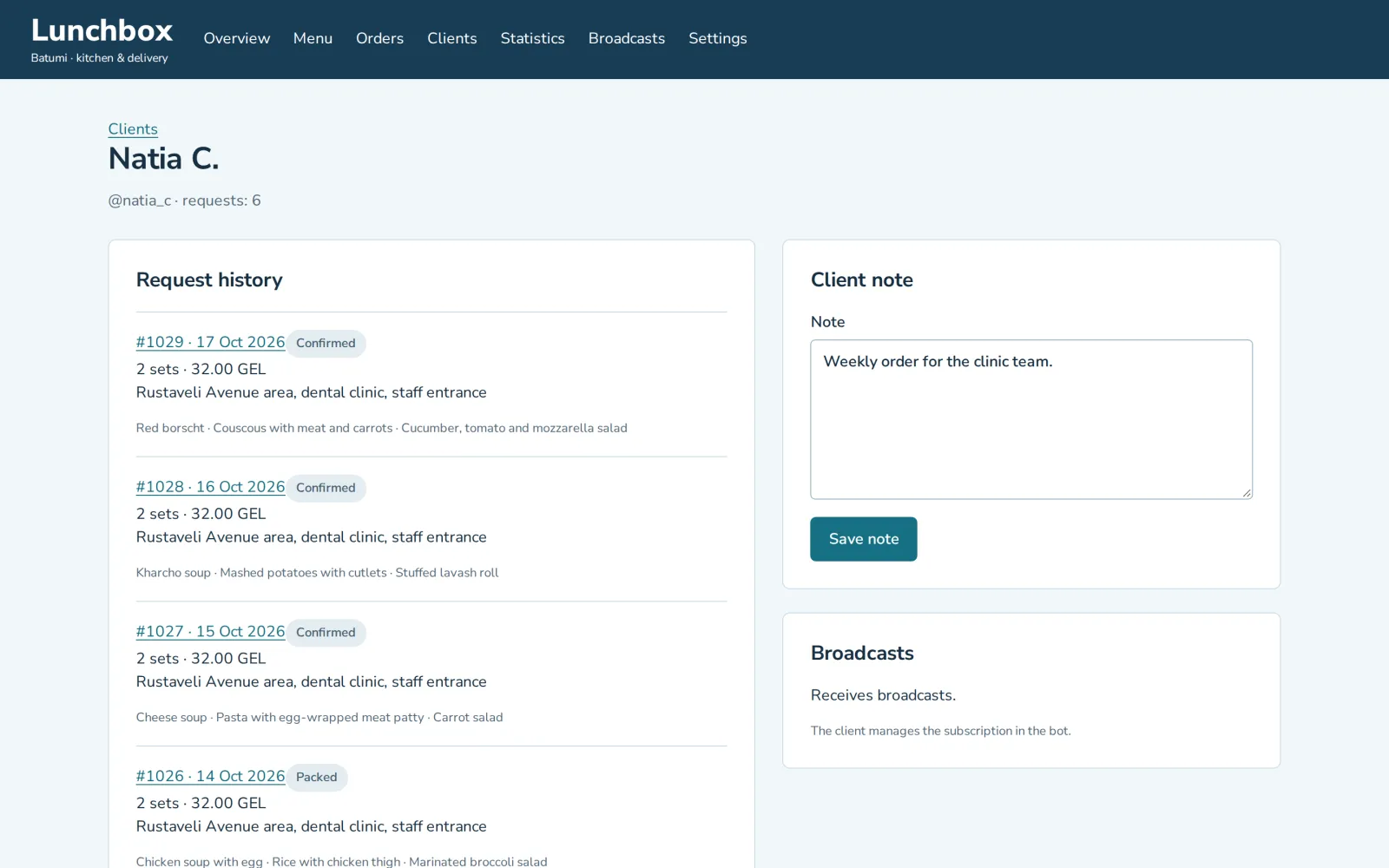
Every request they have made, where it went, and anything the team should know. A Lunchbox client card lists the client’s requests with the date, the address, the number of sets and the dishes, and keeps a note for the team. A regular’s habits sit on one page instead of in someone’s memory.
Weekly orders showed why the rules have to be yours. Clients can order a whole week at once, and after the first real weekly order came in, the rule changed: accepting one day of it accepts the whole week, and the client gets a single confirmation. In a stock CRM, a rule like that is a workaround someone has to build. In a CRM made for the kitchen, it is one rule changed to fit how orders really arrive.
Can the CRM send the menu to clients by itself?
Yes. Each day at noon Batumi time, the menu for the day after tomorrow goes out in Telegram, and only to clients who got a delivery in the past seven days. Nobody has to remember to post it, and clients who stopped ordering a while ago don’t get it.
For everything else there are broadcasts. The owner writes a message, confirms it, and it goes to the bot’s clients.
Statistics sit on a page of their own and cover the last two weeks.
How do the kitchen team and couriers use it?
In the same Telegram bot the clients use, with a role of their own. In Lunchbox the owner’s role in the bot sees every request, and the staff role sees today’s orders to pack and deliver. Nobody installs a courier app or opens the dashboard to find the next address.
Couriers have two buttons that talk to the client: one says the lunch is on the way, the other that the courier has arrived. The client learns both in the same chat where they ordered.
The busiest day so far brought 15 orders through the bot. The client says deliveries are more accurate now and the kitchen saves a lot of time, though nobody has measured it in hours, so we give no figure.
A kitchen CRM, a generic CRM or a spreadsheet?
Most food businesses still work without a CRM. In 2025, 19.7% of companies in accommodation and food service in the EU used CRM software, against 28.5% across all the sectors the survey covers, according to Eurostat. Those figures count only companies with 10 or more people. A kitchen with a smaller team is not in them at all.
For a kitchen that is outgrowing chat, the choice usually comes down to three options:
| Job | Spreadsheet and chat | Generic CRM | CRM built around the kitchen |
|---|---|---|---|
| Taking an order | Retyped from a message | Typed in, or brought in by an integration you set up | Lands from the Telegram bot already filled in |
| Statuses | A column someone remembers to update | Stock sales stages you rename | New, contacted, confirmed, packed, delivered, with fixed moves |
| Failed delivery or cancellation | A note, if anyone writes one | A lost stage, with a reason field if you add one | A reason is asked for every time |
| Menu | Another tab or a document | Not part of a CRM | A monthly calendar where days are dragged |
| Daily menu to clients | Sent by hand | Through a mailing tool you connect | Every day at 12:00 to clients with a recent delivered order |
| Couriers | Read the list in a chat | Another user, another login | A staff role in the same bot |
| Cost | Nothing in money | A fee per user, every month | From $500, fixed before work starts |
A spreadsheet is enough while orders are few and one person keeps the whole day in their head. A ready CRM fits when your process matches its stock stages and the team opens it every day; we go through the signs in our article on building or buying a CRM. A CRM built around the kitchen pays off when the menu, the cutoff, weekly orders and couriers are the work itself, not extras bolted onto a sales pipeline.
How much does a CRM for food delivery cost?
A CRM built with us costs from $500 and takes from 2 weeks. What moves the price above that:
- roles: the owner, the kitchen, couriers, and what each of them sees;
- statuses and the rules between them, including which moves need a reason;
- where orders come from: a Telegram bot (from $100 on its own), a site form or both;
- moving your clients over from a spreadsheet;
- mailings, reports and statistics.
The first call and the written scope are free. The price is fixed in that scope before work starts and changes only if the scope does. You click through a working prototype before the bulk of the work, and the person who scopes the project builds it. We work remotely from Batumi, Georgia, in English or Russian.
To see how the Lunchbox system came together, from the bot to the board and then weekly orders, read the story of the build. The dashboard also runs as a live demo on fictional orders, where you can drag cards across the board and days across the calendar.
Questions
How much does a CRM for a food delivery business cost?
With us, from $500, and it takes from 2 weeks. The price depends on the roles, the statuses and the rules between them, where orders come from, moving your data, and mailings and reports. After a free call you get a written scope with a fixed price.
What order statuses does a food delivery CRM need?
The ones your kitchen really uses. Lunchbox Batumi works with five: new, contacted, confirmed, packed and delivered. Rejecting, cancelling or a failed delivery asks for a reason.
Can orders from a Telegram bot go straight into the CRM?
Yes. In Lunchbox Batumi, clients order in a Telegram bot, and the order lands on the board already filled in: the day, the number of sets, cutlery and an address. Nobody retypes it.
Can I move a day’s menu to another date?
Yes. In Lunchbox Batumi the owner drags the day in the monthly calendar to a new date; if that date already has a menu, the two trade places with their photos. Orders already placed keep their date, dishes and price.
How do couriers see their orders?
In the Telegram bot the clients use, under a staff role that shows today’s orders to pack and deliver. Two courier buttons tell the client that the lunch is on the way and that the courier has arrived.
Is a spreadsheet or a ready CRM enough for a small delivery kitchen?
It can be. In 2025 only 19.7% of EU accommodation and food service companies with 10 or more people used CRM software, according to Eurostat. A CRM built around the kitchen pays off when the menu, the cutoff, weekly orders and couriers don’t fit a ready CRM’s stock stages.
Can I try a food delivery CRM before ordering one?
Yes. The Lunchbox Batumi dashboard runs as a live demo on fictional orders, and the order board and the menu calendar work in the browser.
Sources
ZabSoft is a software company in Batumi. The person who scopes your project is the person who builds it.
More from the blog
 ZabSoft · CRM
A CRM for sales in Telegram and other messengers
Why deals fade in chats, what a CRM for messenger sales needs, and when a ready one is enough.
25 Oct 2026 ZabSoft · AI
An AI sales manager for real estate developers
What an AI sales manager can do for a developer: answer buyers within seconds in their own language, quote only your price list and hand each lead to your sales team.
25 Oct 2026 ZabSoft · AI
AI for tender documents: a brief in 2 to 3 minutes
What a brief of a 44-FZ tender holds, why the AI may not guess a single figure, and the features we took out.
25 Oct 2026