A CRM for sales in Telegram and other messengers
Clients write in Telegram, WhatsApp and email, and deals fade between the chats. What a CRM for chat sales needs, shown on Pipey, our own beta CRM now in our archive, and when a ready one is enough.

 CRM · Selling in messengers
On this page
A CRM for messenger sales ties every chat to a contact and a deal, so a conversation can’t go quiet without anyone noticing: one inbox, a visual pipeline, reply drafts and a booking page. Pipey, a beta CRM of our own that is now in our archive, works this way with Telegram: messages land in one inbox, an AI panel drafts the reply and you send it. A CRM built for your business costs from $500 with us and takes from 2 weeks; if your channels and stages fit a ready CRM, start there.
In numbers- A CRM with us costs from $500 and takes from 2 weeks, at a price fixed in writing before the work starts.
- Pipey, our own beta CRM, now in our archive, ties every incoming Telegram message to a contact and a deal in one inbox.
- Pipey’s booking page offers slots for the next 2 weeks, and each booking becomes a contact and a deal at the first stage.
- On a phone, Pipey’s menu turns into a bottom bar with 5 tabs, and a deal moved with a swipe can be undone for a few seconds.
- Harvard Business Review, 2011: firms that tried to contact an online lead within an hour were nearly 7 times as likely to qualify it as those that tried an hour later.
What is a CRM for messenger sales?
A CRM for messenger sales is a CRM that starts from the conversation. Every message from a client lands in one inbox, already tied to a contact and a deal, and every deal sits at a stage the whole team can see. The chat stops being the only record of the sale.
Most CRMs start from the other end: a database of contacts and deals that someone fills in by hand, while the real talking happens in Telegram. For a small team that sells in chats, the gap between the two is where deals go missing.
We built Pipey around the first approach. It is our own product, not a client project: a beta that is now in our archive, with its demo still open. The goal was a CRM that pays off in its first ten minutes: you connect a channel, see your conversations and reply from the same screen. What this article says about Pipey comes from the product and its open demo, which runs on fictional data for a design studio.
Why do deals get lost in messengers?
Deals get lost in messengers because a chat has no status, no next step and no single place where everything lives. The clients are already there: over two billion people use WhatsApp every day, and millions of them chat with businesses, Meta wrote in April 2025. The trouble is on the business side.
In a small studio or a one-person business, the “CRM” is usually a chat list, a notes app and a spreadsheet nobody updates. That holds on a quiet day. On a busy one, three things slip:
- The status. Whether a client got the price, asked for a discount or went quiet lives in one person’s head. A chat that has scrolled down the list looks just like one that closed.
- The next step. Nothing tells you that a client asked for a quote on Tuesday and has heard nothing since. The deal doesn’t fail, it fades.
- One place to reply from. Telegram on one phone, WhatsApp on another, email on the laptop. To answer “what did we promise this client?”, someone scrolls through all three.
Waiting costs more than it seems. In a study published in Harvard Business Review in 2011, covering 1.25 million sales leads that came in online, firms that tried to contact a lead within an hour were nearly seven times as likely to qualify it as firms that tried even an hour later. The authors counted a lead as qualified once there was a meaningful conversation with a key decision maker. In a separate audit by the same authors, 23% of 2,241 US companies never answered a test inquiry at all.
A messenger shows you the newest message. It doesn’t show you the client who is still waiting for yours.
What does a CRM for chat sales need?
A CRM for chat sales needs five things: one inbox, every message tied to a contact and a deal, a visual pipeline, reply drafts and a booking page. Each one closes a gap from the list above. Here is how they look in Pipey.
The inbox comes first. Messages land in one list and are tied to a contact and a deal automatically, so the first message from a new client already makes a contact, and nobody copies names into a spreadsheet. Each contact has a profile page with their history in one place.
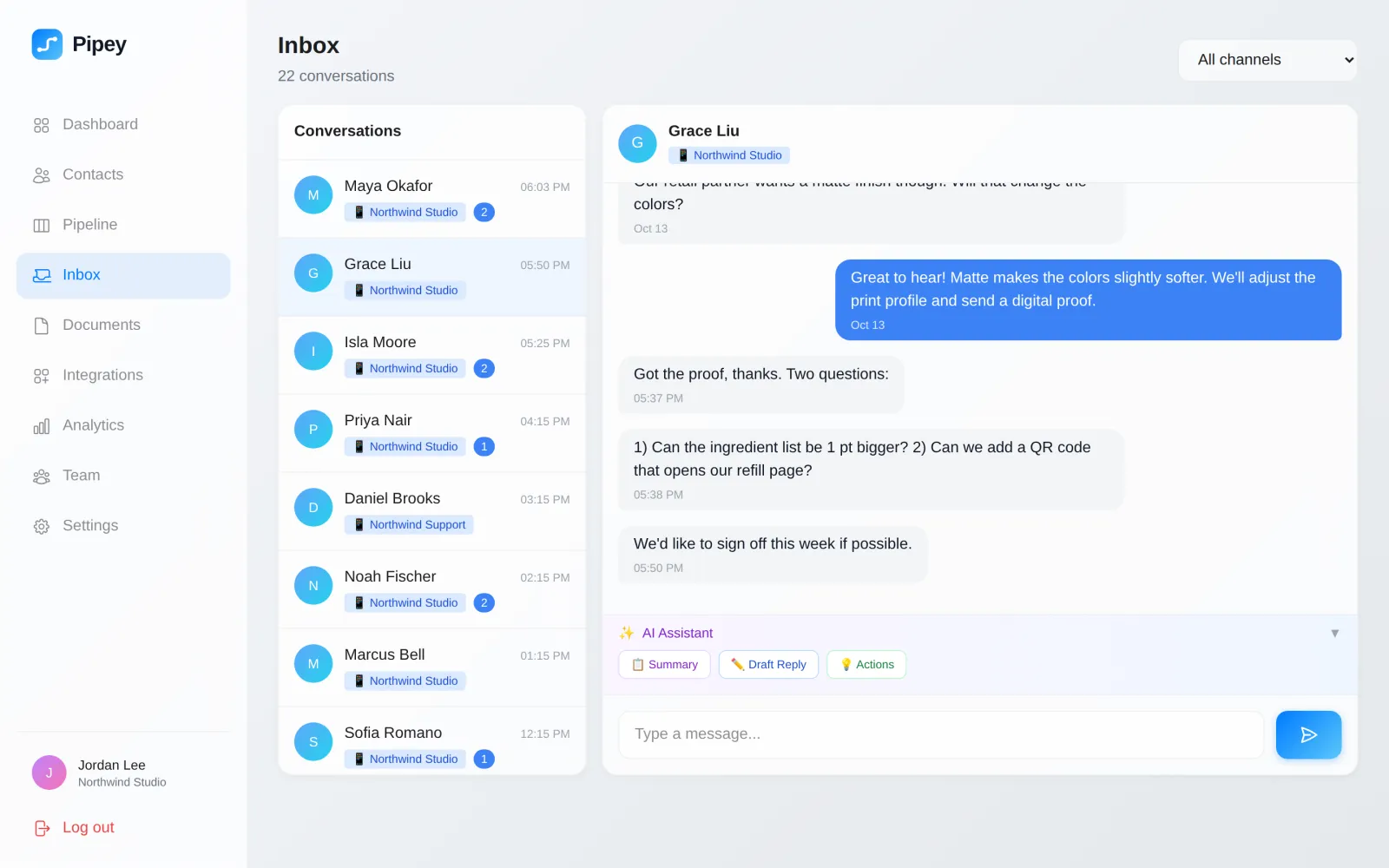
Deals sit on a visual pipeline, one column per stage. On a computer you drag a deal to the next stage; on a phone you swipe it, and an undo button stays on screen for a few seconds in case your thumb slipped. A deal that has waited too long at the quote stage stays on the board instead of scrolling away.
Beside the open chat sits an AI panel with three jobs: a draft reply, a short summary of the thread and a suggested next step. The draft stays a draft until you edit and send it; nothing leaves on its own. The draft saves typing, and the summary saves rereading a long thread before you answer. We look at where this kind of help pays off in our article on AI in a small business.
The paperwork starts from the deal too: a quote or an invoice as a PDF, or a product card. And instead of agreeing on a time over a string of messages, you send a link to a public booking page where the client picks a slot in the next two weeks. The booking itself becomes a contact and a new deal at the first stage of the pipeline.
All of this has to work on a phone, because that is where chat sales happen. In Pipey the side menu turns into a bottom bar with five tabs, the buttons are big enough for a thumb, and Pipey can be added to the home screen like an app. A team works in it with owner, admin and member roles, and analytics show the funnel, revenue, channels and team.
Put side by side, the gaps and the parts that close them:
| Where a deal slips | What the CRM does | How it works in Pipey |
|---|---|---|
| The chat has no status | Every deal sits at a stage | A pipeline: drag on a computer, swipe on a phone, undo for a few seconds |
| Nobody knows the next step | Stalled deals stay in view, and the next step is named | Deals wait in their column, and the AI panel suggests the next action |
| Replies are spread across apps | One inbox, each message tied to a contact and a deal | One inbox for the connected channel, and a profile page for each contact |
| The first reply takes too long | A draft reply is one click away | The AI panel drafts a reply and sums up the thread; you edit and send |
| Finding a time takes a string of messages | The client books a slot on their own | A booking page with slots for the next two weeks; each booking becomes a contact and a deal |
| The quote lives in another tool | The paperwork starts from the deal | A quote or an invoice as a PDF, or a product card |
Which messengers can it connect?
Pipey connects Telegram. Clients write to your business’s Telegram bot, and each conversation lands in the inbox with its contact and deal. The chat goes to the business rather than to someone’s personal phone, so it stays in a shared inbox the whole team can see.
Telegram is the one finished channel in Pipey, and that is the honest limit of a beta. On that channel, a short outage on the messenger’s side no longer costs a message, which matters more than it sounds when any message may be a client.
In a CRM we build for your business, the channels are part of the plan. Which messengers your clients really write in, whether orders also come from a Telegram bot or a site form, and how each one reaches the inbox all go into the written scope, and each integration is one of the things that move the price. In the lunch delivery project, orders from the Telegram bot land on the kitchen’s board on their own, with nothing to retype.
Some clients never write to you first. If they ask for help in public Telegram chats, the step before the CRM is finding them. TGtrigger, an earlier product of ours, listened to the chats you picked and caught the phrases you set, and an AI labelled each match hot, warm, cold or spam, with a one-line reason. A lead found that way is one more conversation to bring into the inbox.
When is an off-the-shelf CRM enough?
An off-the-shelf CRM is often enough when it connects the channels your clients write in, your deals follow the usual stages, and the team opens it every day without being reminded. Then setting it up is most of the job, and a CRM of your own would not pay off.
Two signs matter most: the ready CRM’s stages don’t match how you actually sell, or your team quietly runs a spreadsheet beside it. In chat sales, a few more signs point the same way:
- the channels your clients use don’t reach the stock CRM, so the team copies chats into it by hand, or stops doing it;
- your sale has steps of its own, such as a booked call before the quote, that the stock pipeline doesn’t know about;
- orders also arrive from your own Telegram bot or site, and they belong next to the chats, not in a separate tool.
We weigh the two options in more detail in build or buy: a CRM for a small business. If several of these signs fit, a tool built around how you sell is worth pricing, and that is what our CRM and internal tools service is for.
How much does a CRM for messenger sales cost?
A CRM with us costs from $500 and takes from 2 weeks. What moves the price above that:
- the channels your clients write in, and how each one reaches the inbox;
- who works in the CRM and what each role sees;
- your deal stages and the rules for moving between them;
- other sources of deals and money: a Telegram bot, a site form, payments;
- moving contacts and deals over from a spreadsheet or your current CRM;
- reports and statistics.
The first line deserves the most attention, because every channel your clients use is one more integration. So the first call starts with where your clients write today.
The first call and the written scope are free. We name the price once the work is agreed and counted; it is fixed before the work starts and changes only if the scope does. You click through a working prototype before the bulk of the work, and the person who scopes the project builds it. We work remotely from Batumi, Georgia, in English or Russian.
Questions
What is a CRM for messenger sales?
It is a CRM that starts from the conversation: every message from a client lands in one inbox, tied to a contact and a deal, and every deal sits at a stage you can see. A chat that goes quiet stays in view as a deal waiting for a reply.
Which messengers does Pipey connect?
Telegram is its one finished channel: clients write to your business’s Telegram bot, and each conversation lands in Pipey’s inbox. In a CRM we build for you, the channels your clients use go into the written scope.
How much does a CRM for Telegram sales cost?
With us, from $500, and it takes from 2 weeks. The price depends on roles and screens, statuses and rules, integrations such as messengers, a bot or a site, moving your data, and reports. After a free first call you get a written scope with a fixed price.
Is an off-the-shelf CRM enough if we sell in chats?
Often, yes, if it connects the channels your clients write in and your deals follow its stock stages. A CRM of your own pays off when your sales steps don’t match those stages, or when the team runs a spreadsheet beside it.
Can AI reply to clients for me?
Not on its own. In Pipey the AI panel beside each chat writes a draft, sums up the thread and suggests a next step, but a person edits the draft and sends it.
How fast should I answer a new lead?
As fast as you can. In a 2011 Harvard Business Review study of 1.25 million online sales leads, firms that tried to contact a lead within an hour were nearly seven times as likely to reach a meaningful conversation with a key decision maker as those that tried an hour later.
Can I try a CRM like this before deciding?
Yes. The Pipey demo runs the real interface on fictional data for a design studio, in the browser: you can move deals, ask the AI panel for a draft and open documents. A reload resets everything.
Sources
- Harvard Business Review, March 2011: The Short Life of Online Sales Leads (James B. Oldroyd, Kristina McElheran, David Elkington)
- Meta Newsroom, 3 April 2025: Ways to manage your business chats on WhatsApp (over two billion daily WhatsApp users)
ZabSoft is a software company in Batumi. The person who scopes your project is the person who builds it.
More from the blog
 ZabSoft · AI
An AI sales manager for real estate developers
What an AI sales manager can do for a developer: answer buyers within seconds in their own language, quote only your price list and hand each lead to your sales team.
25 Oct 2026 ZabSoft · AI
AI for tender documents: a brief in 2 to 3 minutes
What a brief of a 44-FZ tender holds, why the AI may not guess a single figure, and the features we took out.
25 Oct 2026 ZabSoft · Cases
A delivery bot and CRM in ten days
How a kitchen in Batumi moved lunch orders out of chat and into a Telegram bot and a dashboard, one day at a time.
15 Oct 2026