Telegram bot for food delivery: orders without retyping
What a customer does in a food delivery bot, what the kitchen and its staff get, and how it compares with taking orders in chats or through delivery apps, on the example of a lunch kitchen in Batumi.

 Bots · Telegram bot for food delivery
On this page
A Telegram bot for food delivery shows your menu with buttons and sends each order to the kitchen already filled in: the day, the number of portions, cutlery and an address, so nobody retypes orders from chats. Our bots start from $100 and take from 3 days. In the bot we built for Lunchbox Batumi, a kitchen that delivers set lunches, customers order a day or the whole week, orders close the day before, and the courier taps “on the way” and “arrived” so the customer gets both messages in the same chat.
In numbers- A Telegram bot starts from $100 and takes from 3 days. Customers install nothing: they only need Telegram.
- On its busiest day so far, the Lunchbox Batumi bot took 15 orders, and the client says deliveries have become more accurate and the kitchen saves a lot of time.
- Every day at 12:00 Batumi time, the bot sends the menu for the day after tomorrow to customers with a delivered order in the last 7 days.
- Orders for a date close the day before, at a time the owner sets, 23:59 by default.
- In 2024, 21% of EU internet users had ordered a delivery from a restaurant, fast-food chain or catering service online in the previous 3 months, according to Eurostat.
What does a Telegram bot for food delivery do?
It takes the order a customer would otherwise type into a chat and hands it to your kitchen already filled in. A Telegram bot for food delivery is a chat inside Telegram that shows your menu with buttons, asks for exactly what the kitchen needs (the day, how many portions, an address) and passes the finished order to you and your staff. Your customers install nothing: the bot opens as one more chat in the app they already use.
We built one for Lunchbox Batumi, a kitchen that delivers set lunches. A set is soup, a main and a salad at the same price every day, and Sunday is a day off. The kitchen’s day has a fixed rhythm: the menu goes out, orders come in until a cutoff, the cooks make exactly that many sets, and the couriers take them to the addresses.
Before the bot, those orders came in as chat messages. Someone had to read each one and copy the day, the count and the address into a list before cooking could start. A food delivery bot removes that step first.
Customers are used to ordering food online. In 2024, 21% of internet users in the EU had ordered a delivery from a restaurant, fast-food chain or catering service online in the previous three months, according to Eurostat’s survey of internet use. For a small kitchen, what matters is where those orders land and whether someone has to retype them.
What does the customer do in the bot?
The customer taps through a few buttons and never types the order out. In the Lunchbox bot it goes like this:
- the bot posts the week’s menu with a button per day and one for the whole week, plus an album of photos of the days on offer (from Saturday it shows the next week);
- the customer taps a day or the whole week;
- chooses how many sets and whether cutlery is needed;
- types an address and sends the order.
Each date stops taking orders the day before, at a time the owner chooses; by default it is 23:59. The count for each day is known before the kitchen starts cooking, and a late order can’t slip in after it.
A week ordered in one go is also confirmed in one go. When the kitchen accepts any day of a weekly order, the whole week is accepted and the customer gets a single confirmation. That rule was added after the first real weekly order came in. And if a customer taps the order button twice, the kitchen still gets one order.
On the day itself, the customer hears from the courier in the same chat. The courier taps one button when the lunch leaves and another on arrival, and the customer gets two short messages: the lunch is on the way, and the courier has arrived.
What do the owner and staff get?
Every order lands in one place, complete, and each person on the team sees the part that is theirs. The owner has a role in the bot with all the requests, and a web dashboard where the same requests sit on a board with five columns, from new to delivered.
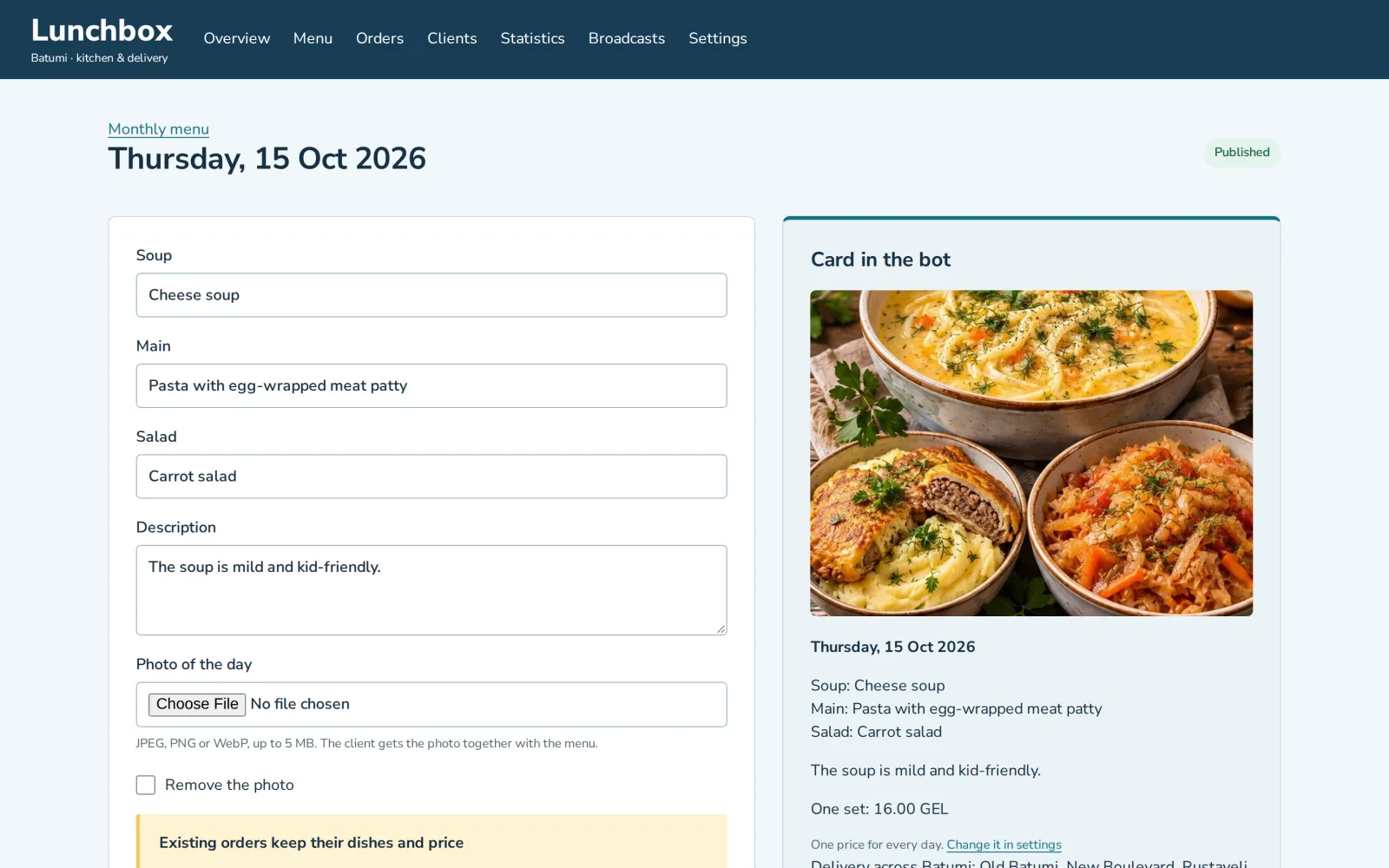
The menu is run from that dashboard too, in a monthly calendar. Next to each day’s dishes the owner sees the card customers will get in the bot, and a day can be dragged to another date.
Then the bot does the rounds that used to be done by hand:
- at 12:00 Batumi time each day, customers whose order was delivered in the past seven days get the menu for the day after tomorrow;
- the owner can also send a broadcast of their own, and it goes out only after a confirmation;
- staff have a role of their own that shows only today’s orders to pack and deliver.
That last point matters for a small team. Whoever packs the sets and whoever delivers them work in the same bot the customers use, so nobody installs a separate courier app.
The dashboard also holds the client list and statistics. It is a small CRM, and our page on CRM and internal tools covers that side. For this article it is enough that an order from the bot appears on the board on its own, and nobody retypes it.
Bot, chat or delivery app: which fits a kitchen?
A bot fits best when most of your orders come from people who already know you and order again. Taking orders in chats costs nothing up front, but every order is a message someone has to read, check and retype. A delivery app brings customers who have never heard of you, and charges for that: Wolt, for example, takes a percentage of the order subtotal on every order, according to its guide for merchants, with the exact terms set in each restaurant’s agreement.
| What you compare | Orders in chats | A delivery app | Your own Telegram bot |
|---|---|---|---|
| How an order arrives | A free-text message that someone retypes | On the app’s own order screen | Filled in by buttons: the day, sets, cutlery, an address |
| Who orders | People who have your number | Anyone nearby who uses the app | Your regulars and anyone you send the link to |
| What each order costs you | Staff time to read and retype it | A commission, a percentage of the order | No commission; the bot itself starts from $100 |
| Orders for tomorrow and the week | Tracked by hand | Depends on the app | A day or the whole week, with a cutoff the day before |
| The next menu | Posted or sent by hand | Seen when the customer opens the app | Sent at 12:00 every day to recent customers |
| The courier on the way | A call or a message from the courier | In the app | Two buttons: on the way, arrived |
The three can run side by side. A kitchen can stay in a delivery app to be found by new customers and move its regulars to its own bot, where an order costs it no commission. A bot does not bring new customers by itself, so plan how people will hear about it: a link on your packaging, in your chats, on your site.
One check comes before all of this: your customers have to be on Telegram. If most of them are not, a bot will not reach them, however good it is.
What changed for the kitchen?
Lunch now takes a customer a few taps, and the owner opens the bot or the dashboard to see today’s count and the addresses. On its busiest day so far the bot took 15 orders, and the client says deliveries have become more accurate.
That is a small kitchen’s scale, but the work the bot removed is the same at any size: reading orders out of chats and retyping them. Every order now arrives with the day, the number of sets, cutlery and an address, which is all the kitchen needs to cook and deliver it.
The client also says the bot saves the kitchen a lot of time. Nobody has counted it in hours, so we don’t put a figure on it.
What should the first version of the bot include?
Start with the order itself: the menu post, the order buttons and the cutoff. That is the part that ends the retyping, and everything else can be added once you see how your customers use it.
The Lunchbox system grew that way. The bot went live first, and the order board, broadcasts, weekly orders and courier buttons followed in steps; the story of the build goes through it day by day.
A good second step is the daily menu broadcast, because it reminds regulars of the next menu without anyone writing to them. A staff role comes next if more than one person packs or delivers. A web dashboard is worth it once the owner needs a board, a client list and a menu calendar on a bigger screen. If one person runs everything from a phone, the admin panel can stay inside the bot.
How much does a food delivery bot cost?
A Telegram bot starts from $100 and takes from 3 days. The price follows what the bot has to do: orders for the whole week, the cutoff, the daily menu broadcast, a staff role, payments in the chat, languages. A web dashboard like the Lunchbox owner’s is a CRM, which starts from $500 and takes from 2 weeks. Our article on what a Telegram bot costs goes through each thing that moves the price.
The first call and the written scope are free. We name the price once the work is agreed and counted; it is fixed before work starts and changes only if the scope does. You click through a working prototype before the bulk of the work, and the person who scopes your bot builds it. We work remotely from Batumi, Georgia, in English or Russian.
Questions
How much does a Telegram bot for food delivery cost?
A Telegram bot starts from $100 and takes from 3 days. The price grows with what it has to do, such as weekly orders, a cutoff, a daily menu broadcast and a staff role, and a web dashboard for the owner is a CRM, from $500 and from 2 weeks. The price is fixed in a written scope before work starts.
Do my customers need to install an app to order?
No. They only need Telegram: the bot opens as one more chat. In the Lunchbox Batumi bot a customer orders with buttons, picking a day or the whole week, the number of sets, cutlery and an address.
Can customers order food for the whole week in a Telegram bot?
Yes. The Lunchbox Batumi bot shows the week’s menu as one post with a button for each day and one for the whole week. When the kitchen accepts any day of a weekly order, the whole week is accepted and the customer gets a single confirmation.
How do I stop orders for tomorrow from coming in too late?
Set a cutoff. In the Lunchbox Batumi bot, orders for a date close the day before, at a time the owner sets, 23:59 by default, so the count for each day is fixed before cooking starts.
Can kitchen staff and couriers work in the same bot?
Yes. Staff get their own role in the bot with today’s orders to pack and deliver. The courier taps a button when the lunch leaves and another on arrival, and the customer gets “on the way” and “arrived” in their chat.
Is a Telegram bot better than a delivery app like Wolt?
They do different jobs. A delivery app brings new customers and takes a percentage of each order, as Wolt’s guide for merchants describes, while your own bot serves the customers who already know you and takes no commission. A kitchen can run both.
Can the bot send the menu to customers automatically?
Yes. The Lunchbox Batumi bot sends the menu for the day after tomorrow every day at 12:00 Batumi time to customers with a delivered order in the last 7 days, and the owner can send other broadcasts after a confirmation.
Sources
- Eurostat: Online shopping in the EU keeps growing, 20 February 2025 (food deliveries from restaurants, fast-food chains and catering services, 2024)
- Wolt: merchant fees and commissions explained
ZabSoft is a software company in Batumi. The person who scopes your project is the person who builds it.
More from the blog
 ZabSoft · Bots
A Telegram bot for an online school or tutor
Groups by level, a seat held while the student pays, lesson balances and payment reminders: what a bot runs for a teacher.
25 Oct 2026 ZabSoft · Websites
A restaurant or bar website: what guests check first
The menu with prices, the mood, today’s hours, the way there and a way to book: what a guest looks for on a phone, and how one lounge bar site answers it.
25 Oct 2026 ZabSoft · Websites
A service company website that brings in requests
Finished jobs, reviews next to them and a short form that lands in your Telegram: what turns a contractor’s page into requests.
25 Oct 2026